
Clinical records
The clinical chart is where the doctor works. It holds the odontogram, medical history, the treatment plan, every visit note, and prescriptions. Only Doctors, Admins and Owners can open it — receptionists cannot.
What it does
Each patient has one clinical record. Open it from the patient profile ("Open clinical chart") or from an in-progress appointment on the day board. It has four tabs — Odontogram, Treatment plan, Visits, Prescriptions — and a persistent header with the medical-history banner.
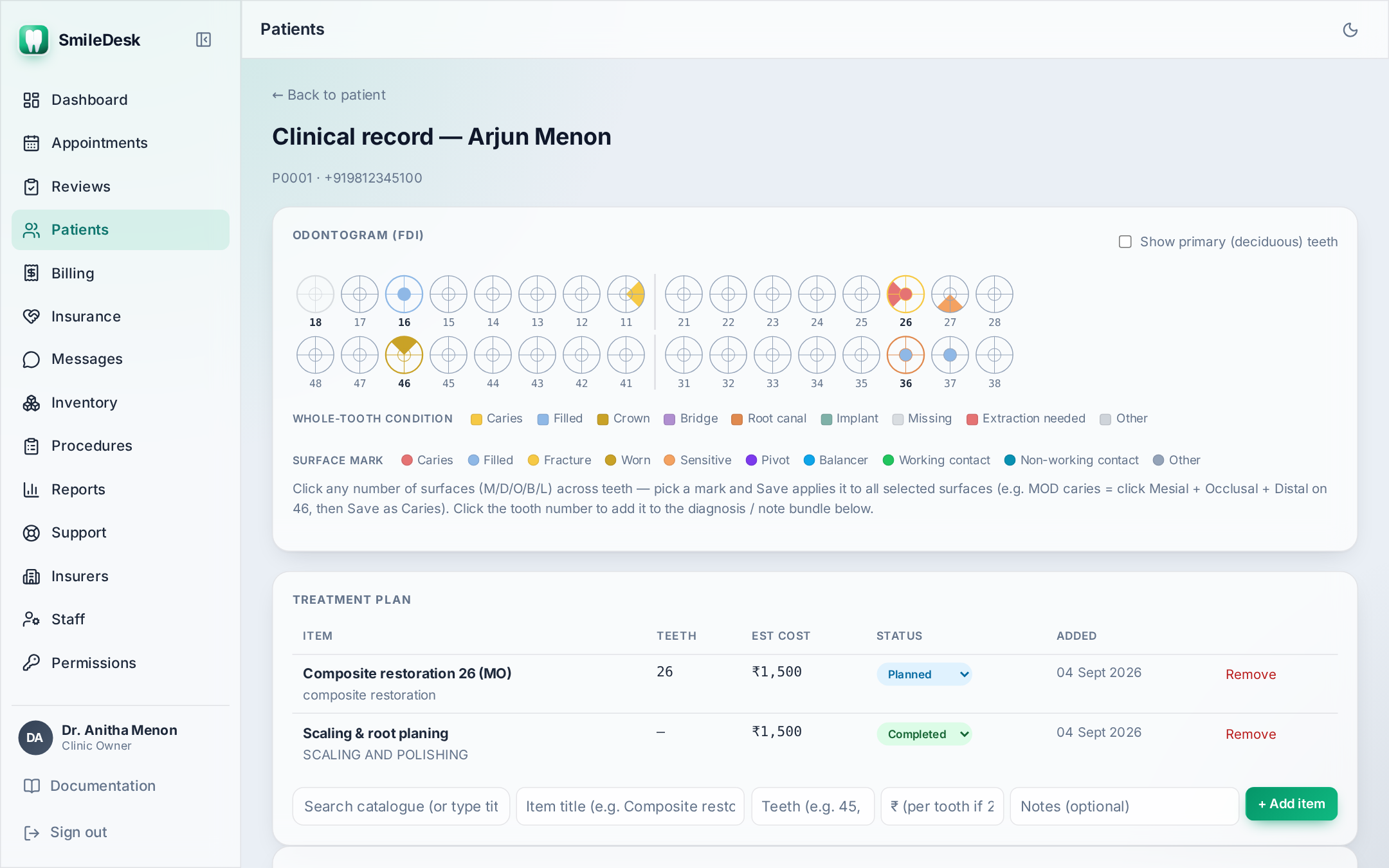
The odontogram
SmileDesk uses FDI numbering — the international standard: quadrant + tooth. 11 is the upper-right central incisor, 46 is the lower-right first molar. Primary teeth use 51–85. The layout switches automatically to primary dentition if the patient's DOB puts them under 6.
Marking a tooth
- Click the tooth. A small panel opens.
- Pick a condition — Caries, Filled, Missing, Root canal, Crown, Bridge, Fractured, Mobile, Impacted, Extraction advised.
- Optional: pick surfaces (M, O, D, B/F, L/P). Surface marks appear as small coloured wedges on the tooth glyph.
- Add a one-line note if needed ("mesial-occlusal, deep").
- Save. The tooth is colour-coded by condition; hovering shows the note.
One condition per tooth. Setting a new condition replaces the previous one. If you need history ("was Caries in Jan, now Filled"), it lives in the visit note — not on the odontogram.
Treatment plan
Treatment plan items are the bridge between the doctor's plan and the receptionist's invoice.
- Each item has a procedure, an optional tooth number, a status (planned / in progress / completed / cancelled), and an estimated cost that defaults to the procedure catalogue price.
- When a procedure is completed, it becomes selectable when creating an invoice — this is how the doctor's day feeds directly into the front desk without re-typing.
- Multi-visit treatments (RCT, ortho, implants) usually live as one plan item with status in progress across multiple visits, marked completed only when the case closes.
Visits (per-visit clinical notes)
One row per visit. Structure is loose on purpose — SOAP-adjacent but not rigid:
- Chief complaint — the patient's own words if possible ("pain on chewing, left back tooth, since 3 days").
- Examination — what you found.
- Diagnosis — your read.
- Treatment done — what actually happened in the chair today.
- Advice — follow-up, dietary, hygiene.
Void a note (Admin only) hides it from the chart but keeps it in the audit log — the note is never destroyed.
Prescriptions
Per visit. Each line: medicine, form (Tablet, Syrup, Injection, Ointment, Mouthwash), dose, frequency, duration, instructions.
Frequency uses Indian shorthand — pick from the dropdown or type your own:
1-0-1— one in the morning, none afternoon, one at night.1-1-1— three times a day.BD— twice daily.TID/TDS— three times.QID— four times.SOS— as needed.STAT— one dose immediately.HS— at bedtime.
Print or send-over-WhatsApp is one click. The WhatsApp version is a PDF attachment (via Pulse) with the clinic letterhead.
Antibiotic stewardship reminder. Add a duration on every antibiotic line. India's antibiotic-resistance rates are rising — an underspecified prescription (no duration, no stop instruction) is a real clinical risk.
Common pitfalls
- Marking a tooth "Missing" that is actually impacted — impacted has its own condition. Missing means the crown is not in the mouth.
- Forgetting to change plan status to "completed" — if it stays in progress, the receptionist won't see it in the invoice picker and will have to add it manually.
- Writing pathology in the visit note but not on the odontogram — the odontogram is what other doctors see first. Keep them in sync.
Clinical workflow question we haven't covered?
Contact support →