
Inventory
The medical store is stock-only, not a billing channel — clinics dispense medicines and consumables as part of treatment, not as a separate sale. SmileDesk tracks batches, expiries and every movement so nothing quietly goes past its date.
What it does
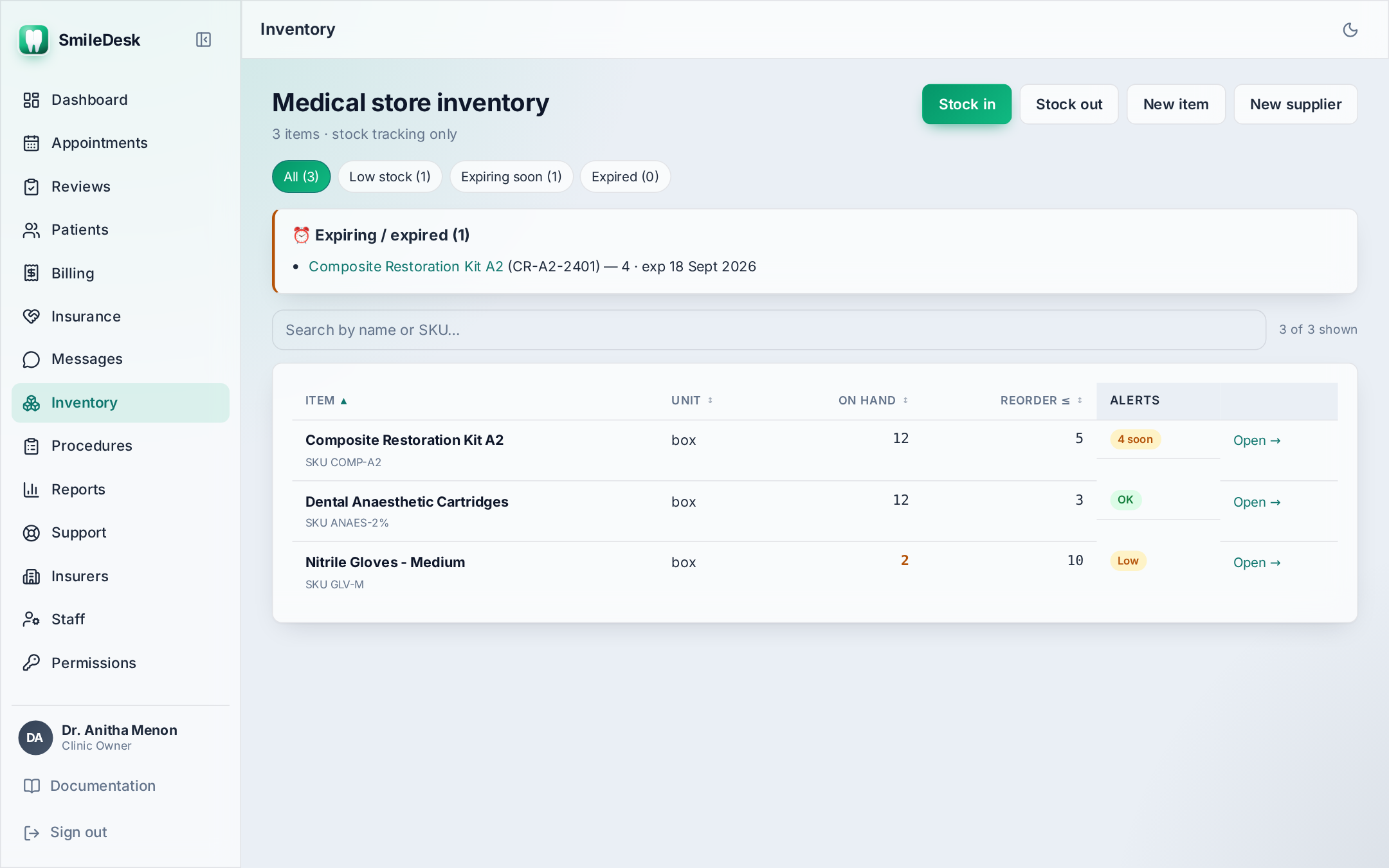
The Inventory screen lists every item you keep — anaesthetic cartridges, composites, gloves, antibiotics, sutures, whatever. Each row shows the item's on-hand quantity (summed across all live batches), the reorder level, and coloured badges for low-stock and expiring/expired batches.
Setting up your items
- Open Inventory → New item.
- Name (e.g. "Lidocaine 2% with adrenaline 1:80 000, cartridge").
- Unit — Cartridge, Tablet, Piece, Bottle, ml. This is what "on hand" is counted in.
- Reorder level — the quantity at which the item gets a low-stock badge (e.g. 20).
- Save. On-hand is zero until you record your first stock-in.
Stock-in — recording new stock
Every stock-in creates a batch. A batch is the traceable unit — one row per delivery.
- Open the item and click Stock in.
- Enter batch number (from the manufacturer's label).
- Enter expiry date.
- Enter quantity and supplier.
- Save. A stock_in movement is logged with your name and today's date.
Always type the batch and expiry from the pack. Guessing here defeats the whole point. If you can't read a label, take a photo with your phone and read from that.
Stock-out — FEFO dispensing
When stock leaves the store — chair-side use, given to a patient with a prescription, discarded — record a stock-out.
- Open the item, click Stock out.
- Quantity + a short reason ("Given to P0117 with prescription", "Used on chair 2 for RCT").
- Save. SmileDesk allocates from batches using FEFO — First Expiry, First Out — so the earliest-expiring batch is drawn down first, spanning multiple batches if needed.
- One movement row per batch touched, each signed with your name.
Why FEFO matters
If you dispense from newer batches first, older batches quietly expire on the shelf — and you throw away money. FEFO is not optional in SmileDesk; it is how stock-out works. If you need to force a specific batch (say, one is contaminated and you want it burned), use Adjust batch instead of a stock-out.
Adjustments
Any change that is not a straight in / out is an adjustment. Reasons include:
- Physical count differs from system count (shrinkage, miscount).
- A batch is damaged / contaminated and being written off.
- Return to supplier.
Open the item → the batch row → Adjust. Enter the new quantity and a reason. The delta is logged as a stock_adjust movement with the reason.
Alerts
- Low stock — on-hand ≤ reorder level. Yellow badge on the list.
- Expiring — at least one batch expires within 30 days. Orange badge.
- Expired — at least one batch is past expiry. Red badge — remove and adjust it out.
The Dashboard shows a combined low-stock count so the Owner sees it every morning.
Item history
Click any item to see the full movement history — every in, out and adjust with the actor, timestamp, quantity, batch, and reason. This is your source of truth if a stock number is ever disputed.
Who can do what
- Staff — can stock-in, stock-out and adjust (they usually run the store).
- Doctor — read-only. Can see quantities but not change them.
- Receptionist — no access.
- Admin / Owner — full access.
Common pitfalls
- Stocking-in without a batch number — traceability breaks the moment there's a recall. Always fill it.
- Adjusting instead of a stock-out — a stock-out ties the reduction to a reason ("dispensed"); an adjustment reads as "we miscounted". Use the right one.
- Reordering everything at once — set realistic reorder levels per item. A 20-cartridge threshold on anaesthetic and a 3-tube threshold on composite are wildly different.
- Discarding expired stock quietly — always Adjust it to zero with the reason "expired, discarded". The audit needs the trail.
Inventory number not adding up?
Contact support →